
If you can’t add a Facebook Page to Instagram, you are not alone. This issue frequently occurs among businesses, advertisers, and agencies managing multiple Facebook Ads Accounts, Business Managers, and brand assets. More importantly, the inability to connect a Facebook Page with Instagram can directly affect ad performance, attribution accuracy, cross-platform publishing, and access to advanced advertising features. This article provides a clear, structured, and expert-level explanation of why this problem happens and how to resolve it efficiently, with practical insights relevant to Facebook Ads professionals.
Why Connecting Facebook Page and Instagram Matters for Advertisers
Linking a Facebook Page to an Instagram account is not just a technical step. It is a prerequisite for running Instagram ads through Facebook Ads Manager, enabling unified inbox management, leveraging Meta Pixel and Conversions API signals, and accessing advanced features such as branded content ads, cross-posting, and campaign optimization across placements. According to Meta’s internal data, advertisers using both Facebook and Instagram placements see up to 23% lower CPA compared to single-platform campaigns, highlighting the operational importance of proper account linkage.
Common Reasons You Can’t Add a Facebook Page to Instagram
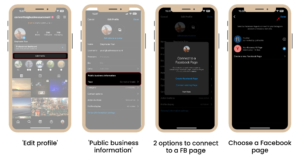
The most frequent cause is insufficient permissions. To connect a Facebook Page to Instagram, you must be an Admin of the Facebook Page and have full control of the Instagram account. Editor or Advertiser roles are not sufficient. In Business Manager environments, many users mistakenly have asset access rather than business-level admin rights, which prevents the connection.
Another major issue lies in Business Manager ownership conflicts. If the Instagram account is already linked to a different Business Manager, you will not be able to add it unless it is removed from the previous Business Manager. This scenario is common when agencies inherit client assets or when accounts were set up years ago without proper documentation.
Technical inconsistencies within Meta’s ecosystem can also block the process. Facebook Pages created under personal profiles rather than Business Managers, Instagram accounts not converted to Professional (Business or Creator) accounts, or Pages restricted due to policy violations can all trigger connection failures. Additionally, Meta enforces security checks; if there has been recent suspicious activity, such as multiple admin changes or login attempts from different regions, linking features may be temporarily disabled.
Step-by-Step Expert Fixes
First, verify roles and permissions. In Facebook Business Manager, ensure you are a Business Admin, not just assigned to the Page. On the Facebook Page itself, confirm you hold the Admin role. On Instagram, switch the account to a Professional account and verify login access directly via the Instagram app.
Second, audit Business Manager ownership. Navigate to Business Settings, locate Instagram Accounts, and check whether the account is already assigned to another Business Manager. If so, request removal or initiate a business verification and ownership claim. Meta allows only one Business Manager to own an Instagram account at a time.
Third, link directly through the correct channel. For most advertisers, the most stable method is via Facebook Business Manager rather than the Instagram app. Go to Business Settings, select Accounts, then Instagram Accounts, and add the account using admin credentials. This method ensures proper asset attribution for Ads Manager, Pixels, and ad accounts.
Fourth, review policy and security status. Pages or ad accounts with restrictions, identity verification issues, or recent policy warnings may not be allowed to connect new assets. Resolving these issues in Account Quality can immediately restore linking capabilities.
Advanced Considerations for Facebook Ads Experts
For agencies managing multiple Facebook Ads Accounts, asset structure matters. Best practice is to centralize ownership within one verified Business Manager, then assign assets via partner access. This reduces conflicts and minimizes the risk of losing control over Instagram accounts during personnel changes. Data from Meta Business Help Center indicates that verified Business Managers experience fewer asset-related disruptions, especially when managing high-spend ad accounts.
Another advanced factor is attribution and tracking. Without proper Page-Instagram linkage, advertisers may see fragmented data in Ads Manager, reduced optimization signals, and inconsistent reporting across placements. This directly impacts machine learning efficiency, especially for conversion-optimized campaigns relying on aggregated event measurement.
Conclusion
If you can’t add a Facebook Page to Instagram, the issue is almost always related to permissions, Business Manager ownership, or account configuration rather than a random system error. For Facebook Ads professionals, resolving this problem is critical to maintaining campaign performance, attribution accuracy, and operational scalability. By auditing roles, consolidating asset ownership, and using Business Manager correctly, you can eliminate this issue and build a more resilient Meta advertising infrastructure.
For advertisers spending at scale, treating asset management as a strategic component of Facebook Ads Account optimization is no longer optional, it is a competitive advantage.