

Facebook ad account restriction is one of the most disruptive issues for media buyers, agencies, and performance marketers. When an account is restricted, campaigns stop delivering, cash flow is interrupted, and scaling efforts collapse almost instantly. Understanding how to fix and more importantly, prevent this issue requires both technical knowledge of Meta’s advertising ecosystem and a strategic approach to compliance.
Understanding Why Facebook Ad Accounts Get Restricted
Before jumping into solutions, it’s critical to diagnose the root cause. Facebook (Meta) uses a combination of AI-driven enforcement systems and manual reviews to detect policy violations. Restrictions typically stem from breaches of the Meta Advertising Policies, but in practice, the triggers are often more nuanced.
Common causes include:
- Policy Violations: Promoting restricted verticals like crypto, gambling, or supplements without proper compliance.
- Unusual Account Activity: Sudden spikes in ad spend, inconsistent login locations, or frequent payment failures.
- Low Feedback Score / Poor User Experience: Landing pages with misleading claims, slow load speeds, or aggressive funnels.
- Circumventing Systems Policy: Using cloaking, misleading creatives, or attempts to bypass moderation systems.
- Trust Score Degradation: New or poorly aged Business Managers with little historical spend.
According to internal industry benchmarks, over 70% of ad account restrictions are tied to landing page or creative compliance issues, not the ad account itself. This is where many advertisers misdiagnose the problem.
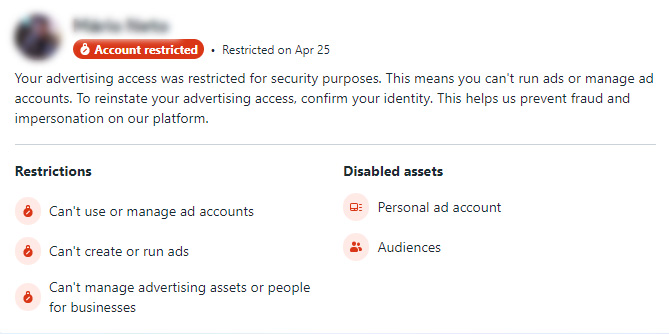
Step-by-Step Process to Fix a Restricted Ad Account
Fixing a restricted Facebook ad account requires a structured recovery workflow rather than trial-and-error.
1. Identify the Exact Restriction Type
Not all restrictions are equal. You need to check whether the issue is:
- Ad Account Disabled
- Business Manager Restricted
- Page Quality Issue
- Payment-related restriction
Each type has a different recovery path. Navigate to Account Quality in Business Manager to get precise diagnostics.
2. Audit Your Entire Funnel
High-level advertisers know that Facebook doesn’t evaluate ads in isolation it evaluates the entire conversion path. This includes:
- Ad creatives (copy, imagery, claims)
- Landing page content
- Domain reputation
- Checkout experience
Key elements to fix immediately:
- Remove exaggerated claims (e.g., “guaranteed results”)
- Ensure compliance disclaimers (especially for Nutra, Crypto, and Financial Services)
- Improve page load speed (aim for under 3 seconds)
- Align ad messaging with landing page content (no bait-and-switch)
3. Clean Up Risk Signals
Meta assigns a risk score to accounts based on behavioral patterns. Reduce risk by:
- Verifying Business Manager and domain
- Using consistent IP/login locations
- Removing unused admins or suspicious profiles
- Ensuring payment methods are valid and stable
Accounts with verified business information have significantly higher recovery rates some agency data suggests up to 40% faster appeal resolution.
4. Submit a Strategic Appeal
The appeal process is where most advertisers fail. Avoid generic responses. Instead, structure your appeal like a compliance report:
- Acknowledge the issue clearly
- Explain what caused it (even if inferred)
- Detail specific corrective actions taken
- Confirm future compliance
Example tone (not copy-paste):
Professional, concise, and responsibility-driven not defensive.
Meta reviewers are more likely to reinstate accounts when they see operational maturity and understanding of policy frameworks.
5. Use Account Recovery Channels (If Available)
For high-spend advertisers or agencies, access to Meta Support Chat or account managers significantly increases recovery success rates. If available:
- Open a support ticket immediately
- Provide case ID and documentation
- Follow up consistently (but not aggressively)
Advanced Recovery Strategies Used by Experts
Experienced media buyers rarely rely on a single account. Instead, they build redundant infrastructure to mitigate risk:
- Multiple aged ad accounts
- Diversified Business Managers
- Agency ad accounts (renting or partnering)
- Pre-warmed accounts with spending history
This approach ensures that even if one account is restricted, operations continue without disruption.
Additionally, many agencies track account health metrics such as:
- Ad rejection rate
- CPM volatility
- Feedback score trends
- Payment success ratio
These indicators often signal an impending restriction before it happens.
Prevention: The Real Competitive Advantage
Fixing a restricted account is reactive. Preventing restriction is where elite advertisers win.
Key prevention principles:
- Treat Facebook Ads as a compliance-driven system, not just a traffic source
- Avoid aggressive scaling patterns (increase budget gradually 20–30% daily is considered safe)
- Maintain consistent ad account behavior
- Regularly audit creatives and landing pages
- Stay updated with Meta policy changes (they evolve frequently)
In competitive verticals like Dropshipping, Affiliate Marketing, and Lead Generation, advertisers who prioritize compliance often achieve longer account lifespan and more stable scaling, even if their initial ROI is slightly lower.
Final Thoughts
Facebook ad account restriction is not random, it’s a predictable outcome of risk signals, policy violations, or operational inconsistencies. The key is to approach recovery methodically: diagnose the issue, fix the root cause, reduce risk signals, and communicate effectively with Meta.
For serious advertisers, the real strategy goes beyond fixing a single account. It’s about building a resilient advertising infrastructure that can withstand restrictions, scale sustainably, and maintain long-term profitability in an increasingly strict ecosystem.
If you’re looking to build a more stable and scalable advertising setup, or facing challenges with your current infrastructure, WeFun Agency is always ready to help. Reach out to our team anytime for fast support, reliable solutions, and expert guidance to keep your campaigns running smoothly.